IT Support Processes: Perspectives on Using SAM Data
itSMF Russia Almanac · 2016
In the third version of the ITIL library (2011), Software Asset Management (SAM) is described in the Service Transition section as part of the Service Asset and Configuration Management (SACM) process. At the same time, ITIL recommends managing software assets separately from other assets, since this process is quite complex. As a standard, ITIL proposes using ISO/IEC 19770 and dedicated automation tools.
The IT service provider must implement appropriate and auditable procedures for SAM. Ideally, these will be compliant with the international standard for SAM, ISO/IEC 19770. Effective SAM is dependent on use of appropriate tools, including a CMS and a definitive media library (DML).
Software asset management fundamentally differs from the more general IT asset management process by additional risks that are not characteristic of other assets:
- Using software without purchasing the corresponding licenses
- Losing information about purchased software licenses
- Unknowingly violating the terms of software acquisition and usage
- Purchasing more licenses than the organization actually needs and lacking awareness of excess licensing
Of course, it is possible to conduct point audits by selected software vendors, and this may close a number of acute issues, but it will not allow continuous control over all the risks listed above.
To manage these risks, an organization needs to create an internal competence center for software asset management. In addition, it needs to deploy a dedicated SAM tool (e.g. Miss Marple Enterprise Edition) or use a SaaS service (e.g. SAM2GO), which can shift the risks of maintaining an expensive competence center to a partner.
In any case, a considerable amount of time and effort must be spent to build the initial collection of technical inventory data (data about servers, workstations, and software installed on them) and information about existing rights to use software. After that, only new incoming data needs to be analyzed, with minimal effort.
It would seem that all the same data is collected within the IT asset management process in ITSM solutions such as Landesk Service Desk. To populate the CMDB, this system uses standard integration with Landesk Management Suite. However, there is data that is specific to software asset management. This includes:
- Data about the OS and installed software down to the version and patch level
- Data about CIs and PC-to-user relationships
- Data about license balances and license pools
The need for low-level data exchange between SAM and ITSM systems has been recognized for a long time. The opportunities for using SAM data in IT management processes are quite significant and are shown in Figure 1.
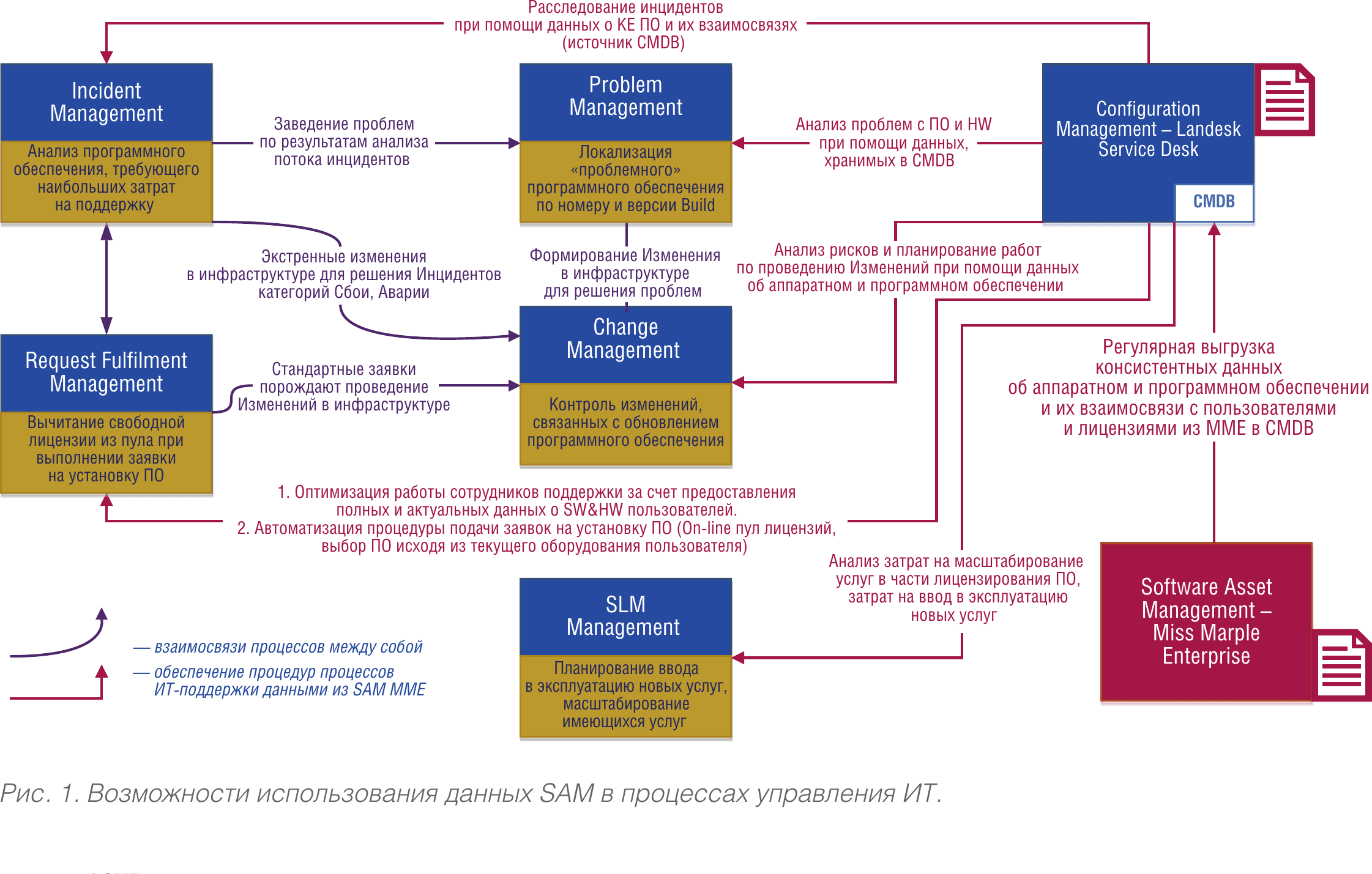
Fig. 1. Opportunities for using SAM data in IT management processes.
As can be seen from the diagram, the basic processes of request management, incident management, problem management, service level management, and configuration management can actively use data from specialized SAM systems. This enables more effective execution of the following procedures:
- Analysis of software requiring the most support costs
- Control of free licenses when fulfilling software installation requests
- Localization of problematic software by build number and version
- Control of changes related to software updates
- Planning new service deployment and scaling existing services
Naturally, beneath these processes lie very specific automation systems for inventory and IT management. However, today many companies with developed infrastructure face the absence of standard integration methods between SAM and ITSM systems. A typical integration scheme for such systems and the use of license management process data in incident, change, and problem management processes is shown in Figure 2.
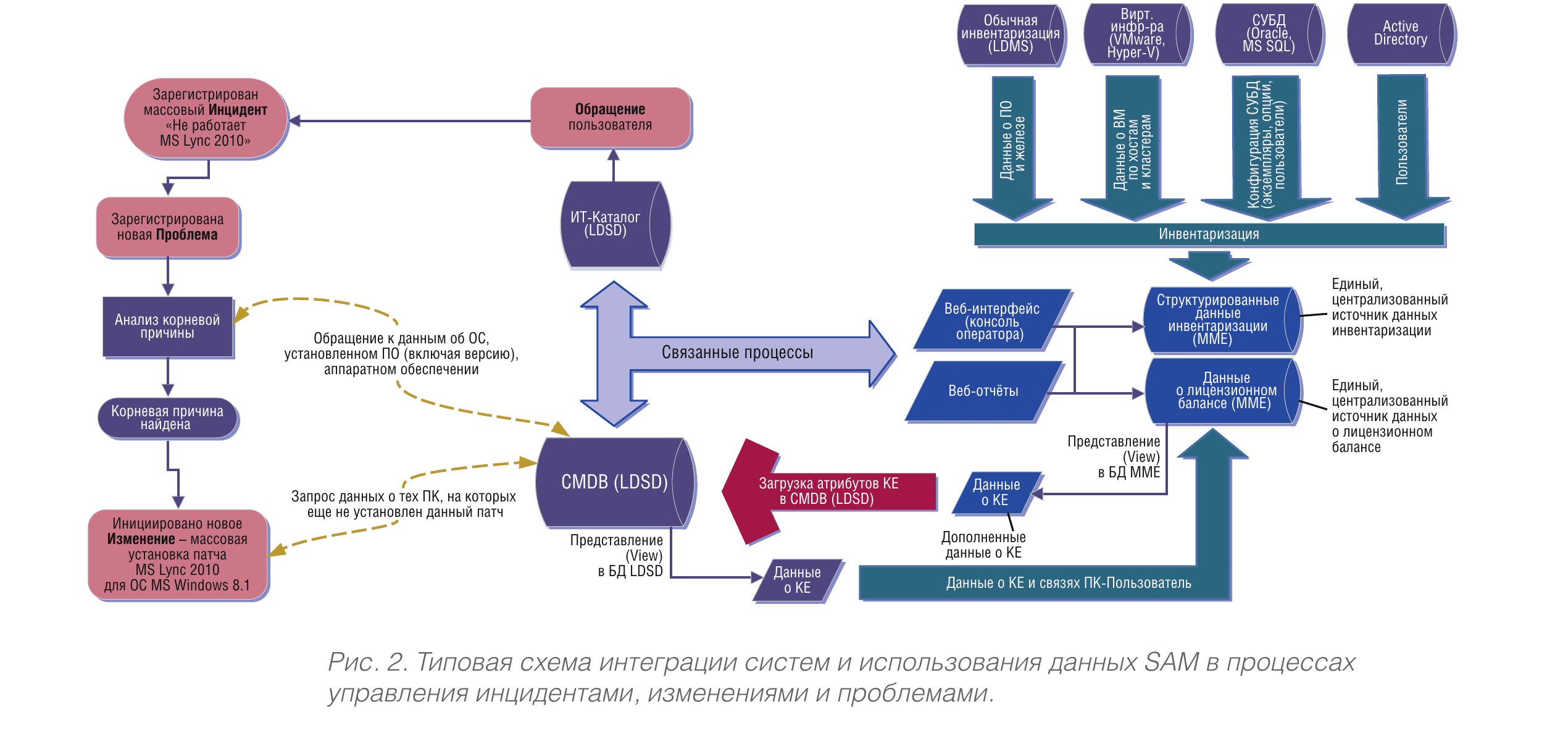
Fig. 2. Typical integration scheme for systems and use of SAM data in incident, change, and problem management processes.
In the upper right corner of the diagram, various sources of infrastructure inventory data are shown (e.g. Landesk Management Suite, virtualization systems, DBMS, Active Directory). On the lower right, the software asset management system structure is shown (e.g. Miss Marple Enterprise), which provides enriched additional CI attributes, license pool data, and data about user relationships with the software they use. In the central and left parts of the diagram, an example of how the ITSM solution operates within incident, change, and problem management processes is shown — resolving the consequences of a mass incident with Lync 2010. Let us consider several examples.
Example 1: Mass Lync 2010 Failure
Situation. The first line of support receives requests about problems with Microsoft Lync 2010. A large number of requests are being registered. How should we act in this situation? The work will likely follow the scenario below (Fig. 2).
- Since there is no information about the root cause of the failure, a problem is registered.
- During the analysis, a query is made to the data about the OS, installed software (including version), and hardware.
- The root cause is found — the problem is related to an incompatibility between Windows 8.1 and the version of Lync 2010 installed on the majority of users' machines.
- A new change is initiated in the infrastructure — a mass installation of the Lync 2010 patch for Windows 8.1.
- Control and planning of the change is conducted by analyzing CMDB data about the software on users' computers and the installed patch, in near-real-time mode. As a result, the patch is installed precisely on those PCs that match the problem criteria.
- A control step identifies the list of PCs on which the update did not proceed automatically, and they will be processed manually.
Example 2: Implementing a Release-Type Change
Situation. A new change has been planned in the IT infrastructure — the release of a new version of internally developed software. How should we act in this situation? The work will likely follow the scenario below (Fig. 3).
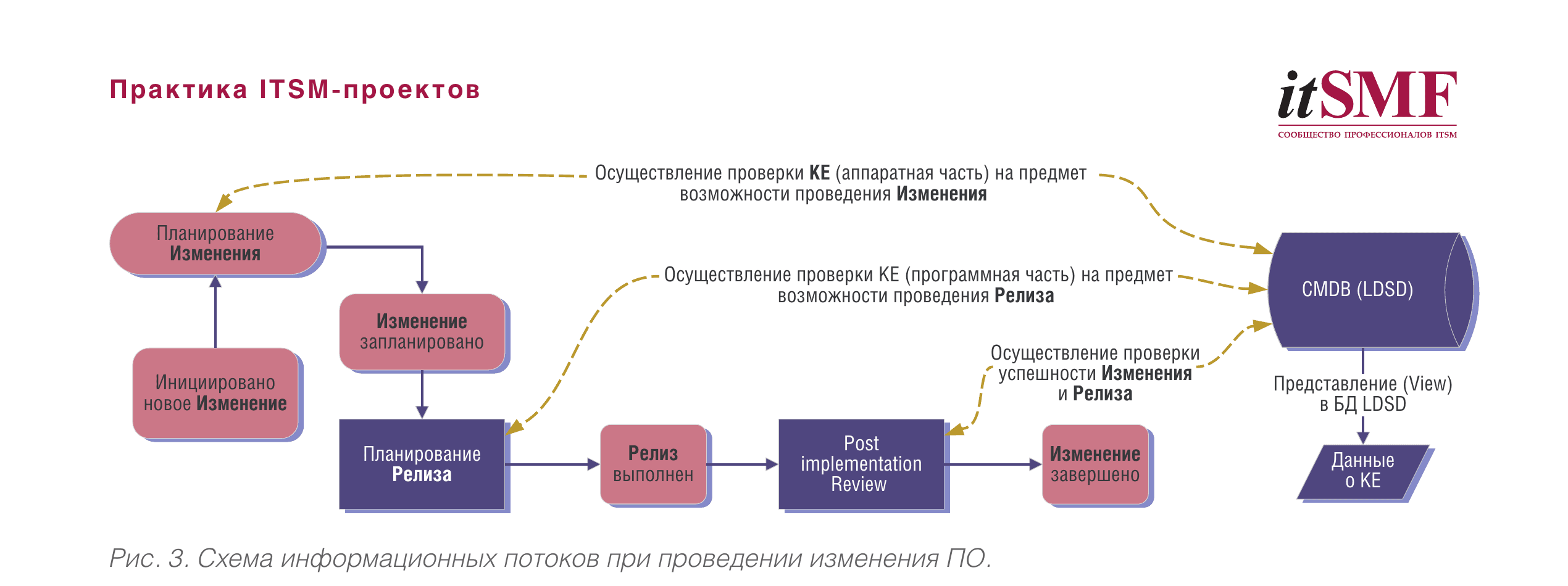
Fig. 3. Information flow diagram for software changes.
- As part of change planning, an analysis of CMDB data is conducted to identify all CIs related to this software.
- A check is performed to verify that all required CIs are operational and that their hardware specifications meet the requirements of the change.
- Next, the release is planned — development, testing, and deployment of the new software version.
- One of the release procedures will include a CMDB check to verify compliance with all required software and licensing requirements for servers and workstations.
- After the new software version is put into production, the success of the release will be verified, and the CMDB will receive data from the SAM system about all changes made.
- The release is closed, and then the change is closed.
Integration benefits. The integration of SAM and CMDB systems will allow maintaining the data necessary for this scenario in an up-to-date state, with an update period of no less than once per day. This will enable generating operational reports for analyzing requests and incidents, planning and controlling changes and releases with minimal effort.
Example 3: Software Usage Control
Situation. We are faced with the task of controlling the software running on users' machines and determining whether it is authorized for use or not. The work will likely follow the scenario below (Fig. 4).
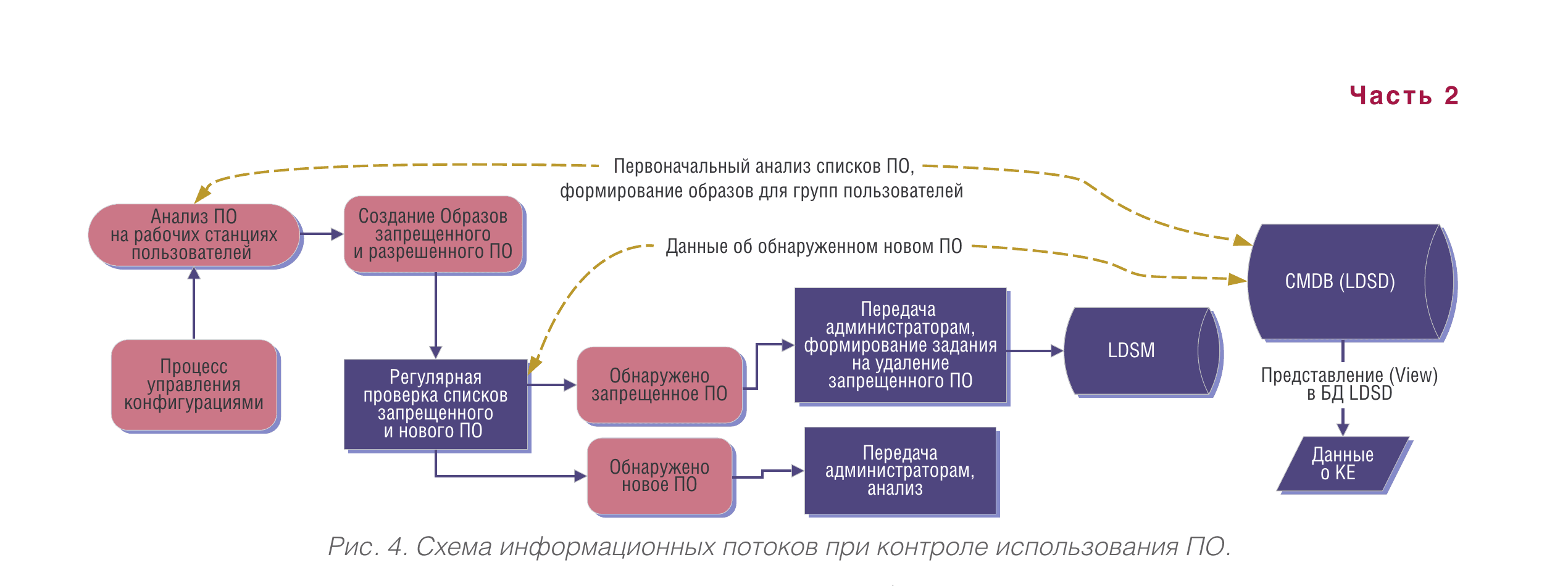
Fig. 4. Information flow diagram for software usage control.
- Using data from the SAM system loaded into the CMDB, an analysis of software on user workstations is performed, and several categories of authorized and prohibited software images are created.
- As part of the configuration management process, the lists defined in the images are compared against data about newly installed software, which the SAM system provides daily. This happens in real time, and a violations report is generated.
- All software from the prohibited list is passed to the CMDB system as a task for removal — in automatic, semi-automatic, or manual mode.
- All new software that does not fall into either the authorized or prohibited category is passed to administrators for classification and inclusion in one list or another.
Integration benefits. The integration of SAM and CMDB systems will allow generating operational reports for analyzing reference software lists on users' computers with minimal effort.
Example 4: Automating Software Installation Requests
Situation. A user submits a request on the portal to install new software. The work will likely follow the scenario below (Fig. 5).
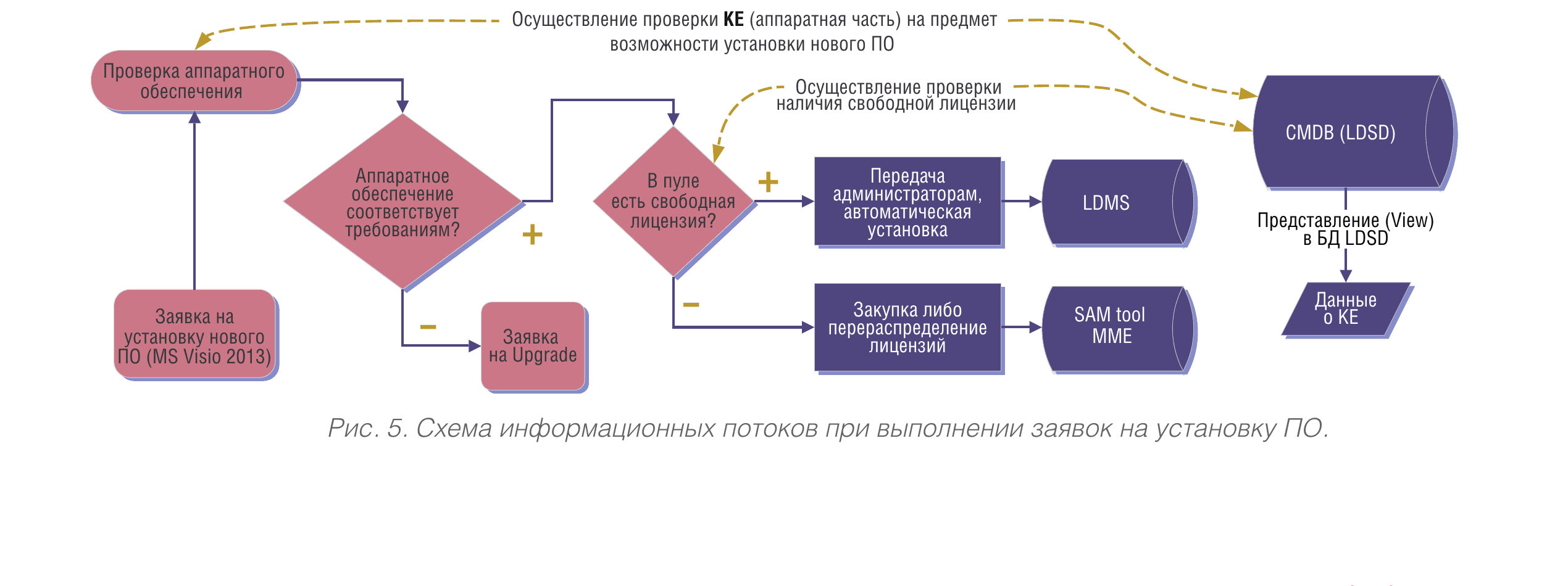
Fig. 5. Information flow diagram for software installation requests.
- A query is made to the CMDB to check whether the configuration of the user's workstation (OS, memory, etc.) meets the requirements of the software being installed.
- If the configuration does not meet the requirements, the user is provided with a recommendation, or a request for hardware upgrade is created.
- If the configuration meets the requirements, a check of the number of available free licenses for the given software is performed.
- If a free license is available, a task is created to install this software on the user's computer (the license is allocated automatically).
- If no free license is available, a notification is generated for the license specialist about the need for an additional purchase or redistribution of existing licenses.
Integration benefits. The integration of SAM and CMDB systems will allow maintaining the data necessary for this scenario in an up-to-date state, with an update period of no less than once per day, enabling the generation of operational reports for managing the license pool and verifying hardware compliance of the ordered software.
Conclusion
IT asset management processes based on ITIL and SAM have many points of contact, both at the level of regulation and at the level of automation. Their closer integration at the procedural level will help organize more effective management of software assets and will support the processes of managing requests, incidents, problems, changes, releases, and configurations. Through the integration of SAM and ITSM systems, it becomes possible to more effectively manage the software license pool, control installed software in accordance with whitelists and blacklists in automatic mode, plan and track the implementation of software changes, and investigate root causes of incidents, failures, and outages in the IT infrastructure.